Pixel art and tilesets in Krita with AI
Pixel art is where an AI that can only "describe" pictures usually fails: it needs exact pixels, a fixed palette and hard edges. MCP Pro for Krita gives the model tools for exactly that, and lets it look at the result with every pixel visible. This guide walks through a tileset from an empty Krita to exported PNGs.
Start from a tileset recipe or a template
One call sets up a complete tileset document:
recipe_pixel_tileset(tile_size=16, columns=8, rows=3, palette="endesga32")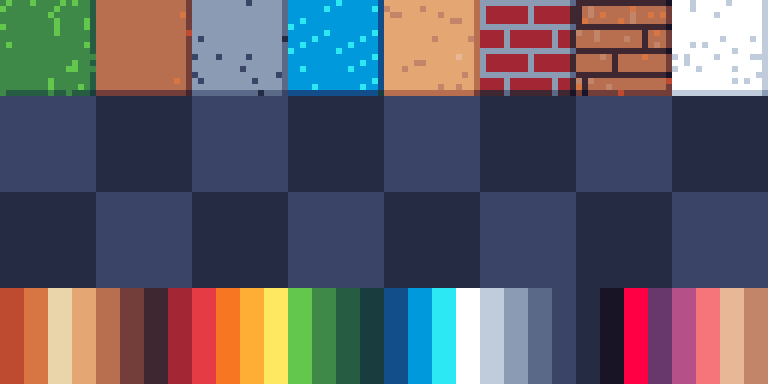
Besides the picture you get tile-grid guides, a Tiles group with Base, Details and a Shading layer in multiply mode, and the pixel-art brush selected. starter_tiles=false leaves the cells empty; seed changes the generated tiles.
For a single sprite or an animation sheet, list_templates and create_from_template offer pixel_sprite_32, pixel_sprite_animation_64 and tileset_16, or call create_document with your own size.
Pick a palette, build ramps
list_palettesshows Krita's palettes plus the built-in pixel palettespico8,sweetie16,endesga32,gameboyandgrayscale8;get_palettereturns the hex colours.generate_color_ramp(base="#3b5dc9", steps=5, hue_shift=20)makes a shading ramp whose shadows shift hue one way and highlights the other, the usual pixel-art trick.extract_palettepulls the dominant colours out of an existing layer, andsave_palettewrites a GIMP.gplthat Krita, Aseprite and others read.apply_palette(palette="sweetie16", dither="ordered")remaps a layer to a palette, optionally with a 4×4 Bayer dither;replace_colorswaps one colour.
Sprites from text rows
Models are good at text grids, so set_pixel_rows takes one character per pixel and a palette legend:
set_pixel_rows(rows=["..kkkk..",
                     ".krrrrk.",
                     "krywwyrk",
                     "krrrrrrk",
                     ".krrrrk.",
                     "..kkkk.."],
               palette={"k": "#1a1c2c", "r": "#b13e53",
                        "y": "#ffcd75", "w": "#f4f4f4"},
               x=10, y=10, layer="Sprite")
. leaves a pixel untouched. get_pixels reads up to 64×64 pixels back in the same row format (with its own legend), so the model can edit an existing sprite line by line. put_pixels sets individual pixels by coordinate.
Hard-edged shapes, outlines, symmetry
draw_pixel_line,draw_pixel_rectanddraw_pixel_ellipsedraw without anti-aliasing (Bresenham lines, filled or outlined shapes).pixel_outlineadds a 1-px outline around opaque pixels (mode="inside"recolours the edge instead).mirror_pixels(axis="vertical", source="left")copies one half onto the other for symmetric sprites.clear_regionerases a rectangle; every call is oneundostep.
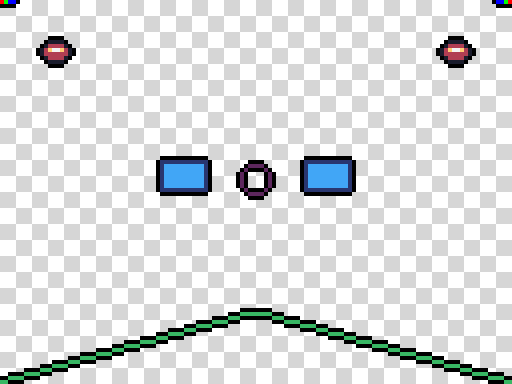
set_pixel_rows, draw_pixel_rect, draw_pixel_ellipse, draw_pixel_line, pixel_outline, then mirror_pixels.Seamless tiles
To check a tile for seams, paint it, then offset_layer(dx=8, dy=8, wrap=true) rolls the pixels around so the edges meet in the middle. Fix the seams there and offset back. set_guides(grid_x=16, grid_y=16) adds a guide every tile.
Look at the result
Ask the AI to call get_canvas_preview after each step. Small pixel art is upscaled with hard edges, so the model sees individual pixels instead of a blur; x, y, width and height zoom into one tile. color_stats counts unique colours, which catches stray off-palette pixels.
Export
export_image(path="D:/game/tiles.png")writes the whole sheet;scaleupscales it.export_layers(directory=..., trim=true)writes one PNG per layer with the offsets.export_multiple_sizeswrites icon sets such as 16, 32, 64 and 128 px.- Building levels from the tileset next? Tiled MCP Pro does the map side.
Limits worth knowing
- Pixel tools edit 8-bit RGBA paint layers. In a 16-bit or CMYK document they refuse with a clear message;
convert_color_space(color_model="RGBA", color_depth="U8")fixes that. - Palettes saved with
save_paletteshow up in Krita's Palette docker after a restart; the tools can use them right away.
Get MCP Pro for Krita
$15 once on itch.io, free updates.